
TikTok Story Downloader
Download TikTok Stories without watermark — fast and works on any device.
TikTok Story Downloader
TikTok has quickly become one of the most popular social media platforms worldwide, with millions of users sharing content daily. But there’s one challenge: TikTok stories disappear after 24 hours. That’s where SnapsGrab comes in — the easiest, fastest, and most reliable way to download TikTok story videos without hassle.
Whether you’re a creator who wants to keep your own content, a fan saving favorite clips, or someone looking for inspiration, SnapsGrab makes it possible in just a few clicks.
Why People Want to Download TikTok Stories
TikTok stories are fun, engaging, and spontaneous — but they’re designed to vanish after 24 hours. Once that time passes, they’re gone forever. Here’s why so many people turn to a TikTok story downloader like SnapsGrab:
-
Preserve Memories – Save birthdays, behind-the-scenes moments, and funny clips before they disappear.
-
Rewatch Tutorials – Many creators share quick tips in stories. Downloading them means you can rewatch anytime.
-
Archive Your Own Content – Creators often use SnapsGrab to save stories they forgot to back up.
-
Offline Viewing – Perfect for when you don’t have Wi-Fi or data.
-
Creative Inspiration – Keep an idea library by saving trending and successful story content.
Without a reliable tool, these moments are gone forever. With SnapsGrab, you can save them permanently.
How TikTok Stories Changed Sharing
TikTok stories aren’t just a passing trend. They’ve become an essential way for users to share quick, authentic, and in-the-moment updates. From reactions to behind-the-scenes clips, stories help creators stay connected to their audience.
The only downside? Their temporary nature. Unless you save them, they vanish. That’s why many users rely on SnapsGrab to download TikTok stories before they disappear.
Meet SnapsGrab – Your Trusted TikTok Story Downloader
SnapsGrab is a free, web-based platform built for one purpose: to make downloading TikTok story videos quick, simple, and watermark-free.
Here’s why it stands out from the rest:
1. No Watermark
Other tools leave distracting logos. With SnapsGrab, you get clean videos exactly as they were uploaded.
2. Completely Free
No subscriptions, hidden fees, or premium upgrades. SnapsGrab is 100% free for everyone.
3. High-Quality Downloads
Videos keep their original sharpness and clarity perfect for archiving, rewatching, or reposting.
4. Works on Any Device
Compatible with Android, iOS, Windows, Mac, or Linux. All you need is a web browser.
5. No App Needed
Save storage space and avoid unnecessary downloads. Everything works online.
How to Download TikTok Story with SnapsGrab
Using SnapsGrab takes less than a minute:
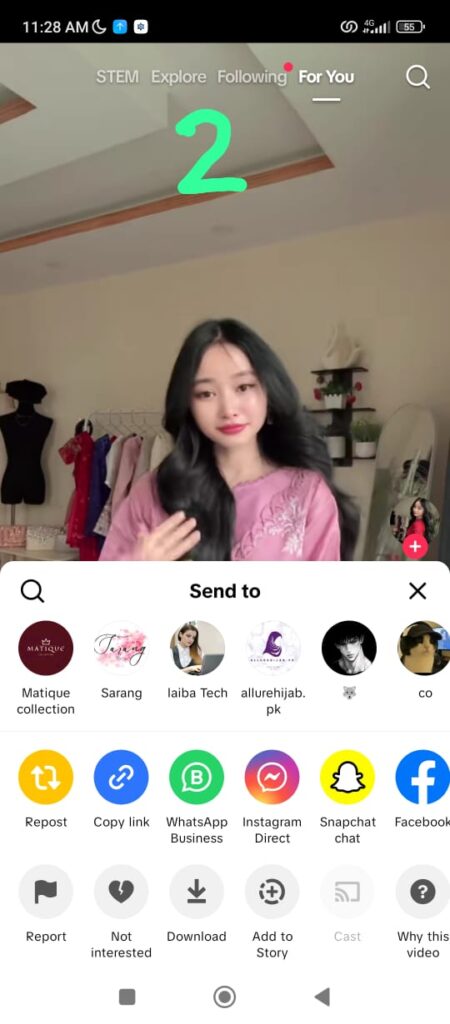
Find the Story – Open TikTok and locate the story you want to save.
Copy the Link – Tap Share, then select Copy Link.
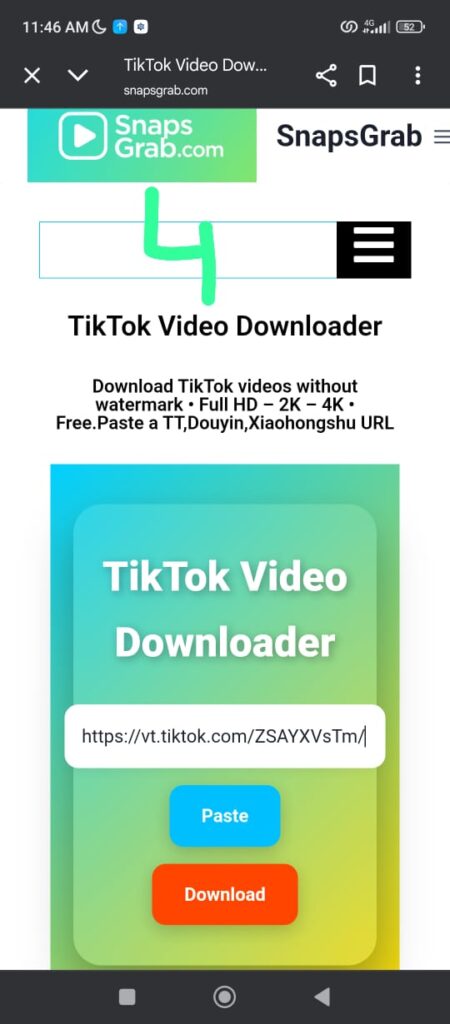
Open SnapsGrab – Go to https://snapsgrab.com in your browser.
Paste the Link – Insert the copied link into the input box.
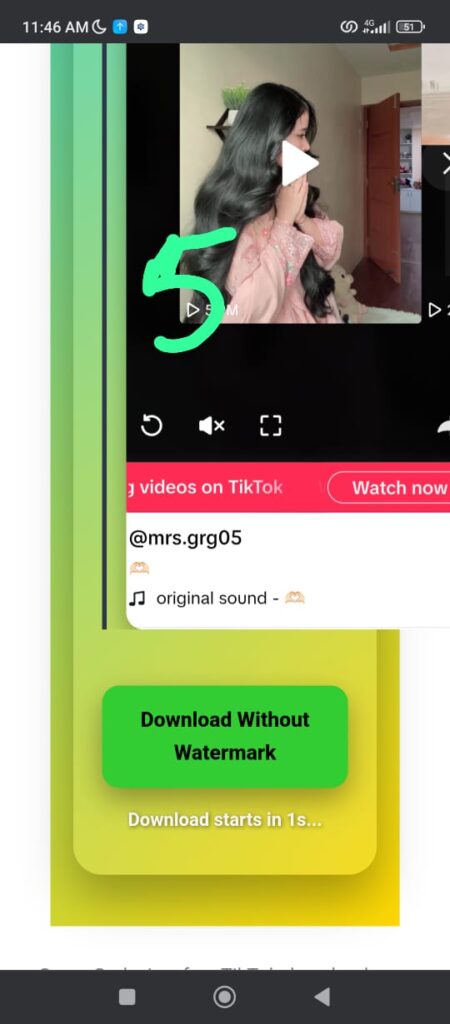
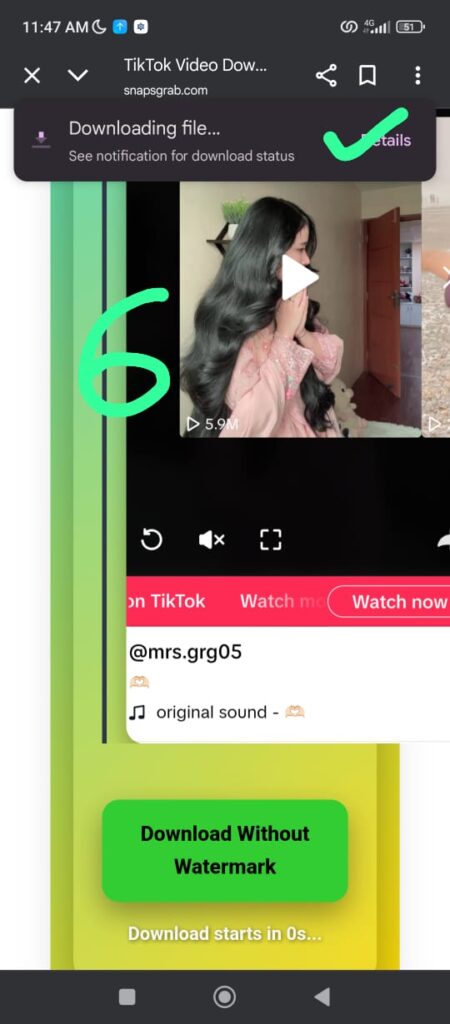
Download the Story – Hit Download and wait a few seconds.
Save the Video – Choose your preferred format and quality, then save it to your device.
That’s it your TikTok story is now saved permanently.


Benefits of Using SnapsGrab
Compared to other downloaders, SnapsGrab is faster, safer, and more reliable:
Keep stories forever, even after they expire.
Share offline with friends or on messaging apps.
Use as a source of inspiration for your own content.
Access downloads from any device, anytime.
Is SnapsGrab Safe?
Yes. SnapsGrab doesn’t require login, personal data, or account details. It also doesn’t store your downloads — once saved, they’re yours alone. With minimal ads and secure connections, it’s a safe choice for all users.
Best Practices for Downloading Stories
Always choose the highest quality option for crisp results.
Save files to cloud storage for easy access anywhere.
Organize downloads by creator or theme for quick reference.
Credit original creators if you repost on other platforms.
Avoid reusing content commercially without permission.
Why SnapsGrab is the Best Choice
Other tools often leave watermarks, lower the quality, or require app installations. SnapsGrab avoids all these frustrations. It’s fast, free, watermark-free, and works directly in your browser.Whether you’re a casual viewer, a creator archiving content, or a social media manager saving client stories, SnapsGrab makes the process simple and reliable.
Save TikTok Stories Before They Disappear
TikTok stories may only last 24 hours, but your favorite moments don’t have to. With SnapsGrab, you can download TikTok stories in seconds, keep them in HD, and watch them anytime.Don’t lose your favorite clips start downloading with SnapsGrab today.
Frequently Asked Questions
How Do I Copy a TikTok Story Link?
- Open the TikTok app on your phone or visit TikTok.com on a web browser.
- Select the Story you want to download and tap the Share icon at the bottom right.
- Choose Copy Link to save the Story link to your clipboard.
Supported link formats include:
- https://vm.tiktok.com/abcXZY123/
- https://vt.tiktok.com/abcXZY123/
- https://www.tiktok.com/@user/video/3044143650998
- https://m.tiktok.com/v/3044143650998.html
Can I Download MP3 Audio from a TikTok Story?
Yes, you can extract the MP3 audio file from a TikTok Story. Just select the MP3 format after clicking the “Download” button on the website.
Is There a Download Limit on SnapsGrab?
We do not impose download limits, allowing you to freely save as many TikTok Stories as you like.
I Can’t Find the Story Video After Downloading It?
If you can’t find the downloaded video, check:
- iPhone/iPad: Open the “Files” app.
- Android: Look in your gallery or “Downloads” folder.
- PC: Check the “Downloads” folder on your computer.
Can I Download Expired TikTok Stories?
TikTok Stories are only available for 24 hours after posting and disappear afterward. Therefore, expired TikTok Stories cannot be downloaded.
Can I Download Multiple Stories at Once?
We don’t currently offer this feature on the SnapsGrab website.
Can I Download, Edit, and Repost TikTok Stories?
Downloading, editing, and reposting someone else’s TikTok Story may violate intellectual property and copyright laws. This is not only unethical but could also lead to serious legal consequences. To avoid any unwanted risks, users should respect copyright by only using content they created or have been legally permitted to use.