
TikTok Slideshow Download
Download TikTok photos and slideshows without watermarks, in full HD quality
TikTok Slideshow Downloader – SnapsGrab
Do you want to download TikTok slideshow without watermark? You can count on SnapsGrab, a powerful tool to save any type of TikTok content. Every slideshow you download through this platform is delivered in high quality and completely free from watermarks.
Is It Possible to Download TikTok Slideshow Without a Watermark?
A slideshow is one of TikTok’s popular content formats. Similar to Instagram’s carousel feature, it lets creators share multiple images in one post. While TikTok allows users to save images, videos, and even slideshows, there’s a limitation: all saved files include a watermark.This watermark shows the TikTok logo and the creator’s username. While it ensures credit for the original poster, it often makes the content look less clean or professional.
If you want to enjoy slideshows without watermarks, you’ll need another solution. Luckily, third-party downloaders like SnapsGrab let you save slideshow content in HD quality without the watermark. Not every downloader supports slideshows, so make sure you pick a tool designed specifically for this feature.
Why Download TikTok Slideshow Using SnapsGrab?
SnapsGrab is one of the most reliable tools to download TikTok slideshow without watermark. It works entirely online, directly from the website, making it accessible anytime as long as you’re connected to the internet.
Here’s why TikTok users continue to trust SnapsGrab:
1. Download Individual Images or Entire Slideshows
With SnapsGrab, you get full flexibility. It displays each image in the slideshow with its own download button. You can either save the entire collection or pick specific photos.
2. High-Quality Results
This tool prioritizes the best possible quality. Slideshows downloaded through SnapsGrab maintain sharpness, detail, and clarity — almost identical to the originals. Of course, the outcome depends on the quality of the original post.
3. Unlimited Downloads
Unlike some platforms that limit downloads, SnapsGrab lets you save as much content as you want without restrictions. There’s no risk of being blocked or forced to clear browser data.
4. Completely Free
There are no hidden costs with SnapsGrab. The service is 100% free to use. If anyone asks for payment, it’s a scam — because SnapsGrab never charges for downloads.
5. No Registration Required
You don’t need to sign up, log in, or provide personal details like email, phone number, or credit card information. Just paste your TikTok link and start downloading.
6. Multi-Language Support
SnapsGrab caters to a global audience. You can switch the interface to your preferred language for easier navigation.
7. Simple and Fast Process
Other tools can feel cluttered or complicated. SnapsGrab keeps things simple: paste the link, select the slideshow option, and download instantly.
8. No Watermark
The biggest advantage is watermark removal. While TikTok’s native downloads always include a watermark, SnapsGrab automatically removes it, so your slideshows look clean and professional.
How to Download TikTok Slideshow with SnapsGrab
The process is quick and straightforward:
Find the Slideshow on TikTok
Open TikTok and search for the slideshow you want. You’ll recognize it by the swipeable image format.Copy the Link
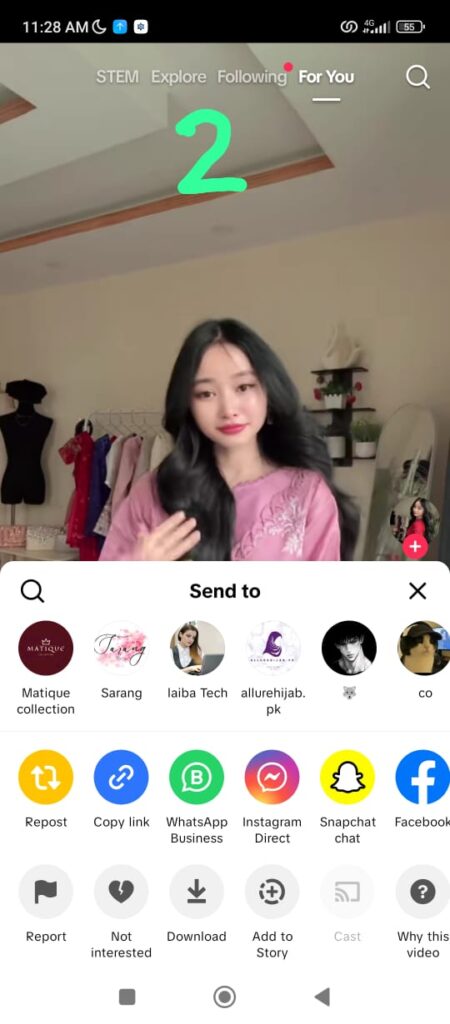
Tap the Share button on the post, then select Copy Link.Visit SnapsGrab
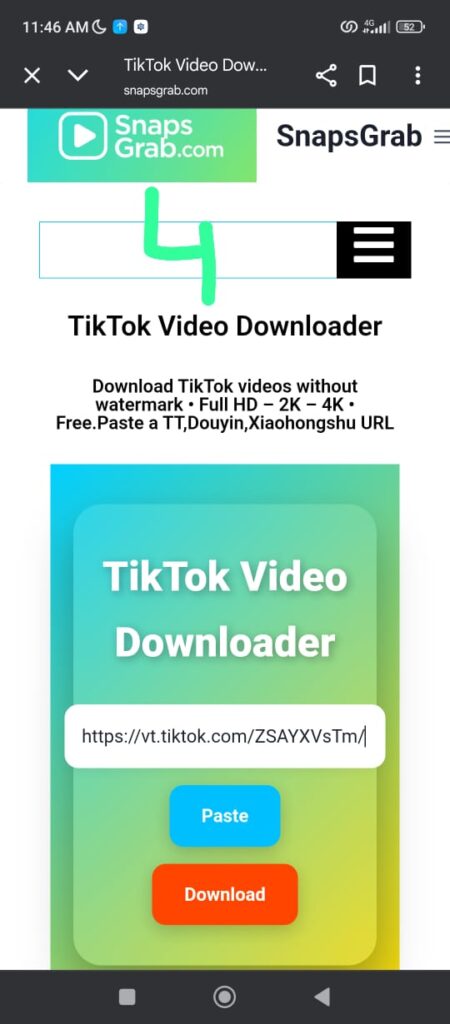
Open your browser and go to https://snapsgrab.com.Paste the Link
On the homepage, paste the copied link into the input box. Before you proceed, choose the Slideshow option at the top.Download the Images
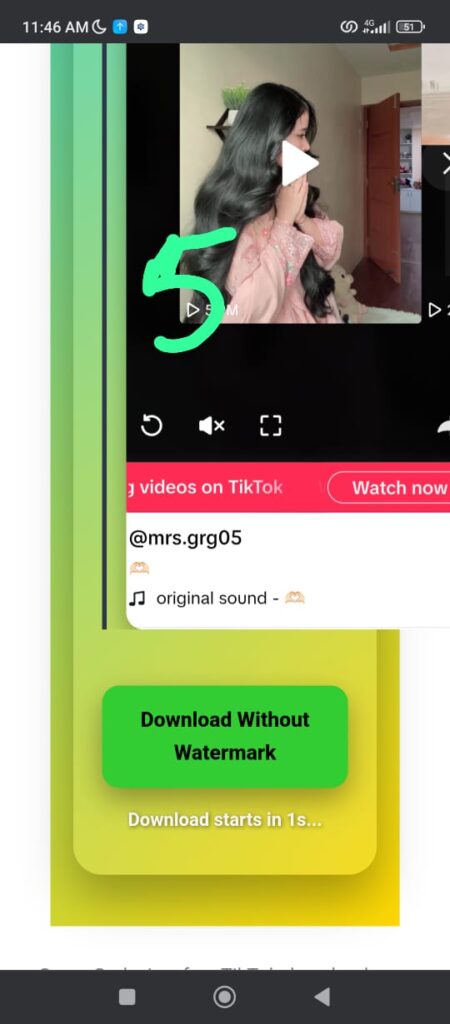
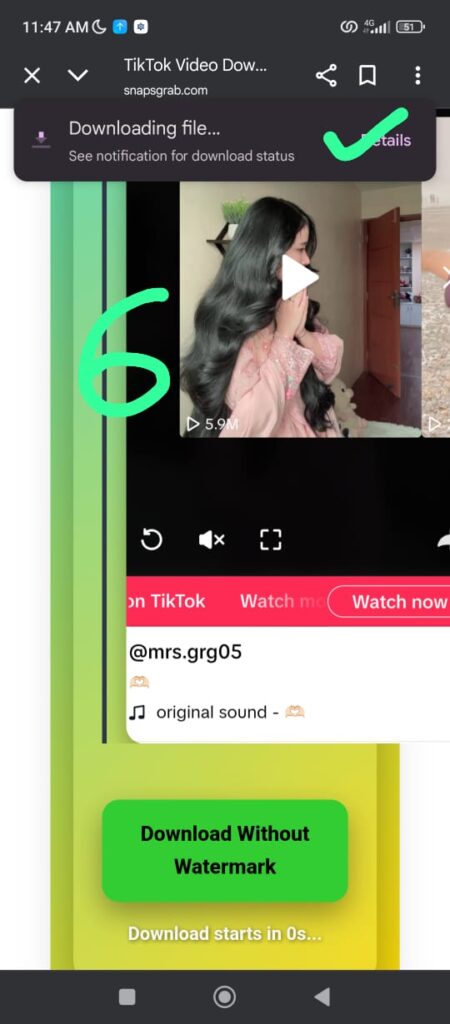
Click Download. You’ll see a preview of the slideshow. Save individual images or the entire collection in just a few seconds.


Extra Tips for Using SnapsGrab
Preview First: Always check the image previews before downloading to confirm you copied the correct link.
Public Accounts Only: Content from private accounts can’t be downloaded, as SnapsGrab respects TikTok’s privacy rules.
Any Device Works: Since it’s web-based, SnapsGrab works on Windows, macOS, Android, and iOS — no apps required.
Choose High-Quality Content: For the best results, select slideshows with sharp, high-resolution images.
Use a VPN if Needed: If the site is blocked in your region, enable a VPN to access it.
Free Up Storage: Make sure your device has enough free space to save multiple slideshow images.
Is SnapsGrab Safe to Use?
Yes SnapsGrab is safe. It doesn’t require you to create an account or provide sensitive data. The platform also keeps ads minimal, reducing the risk of unwanted malware pop-ups. For extra security, you can enable antivirus or anti-malware protection on your device while browsing.
Responsible Use and Ethics
Downloading TikTok slideshow without watermark should always respect the rights of content creators. Use downloads for personal use, fair use, or creative projects where appropriate.Avoid reposting other people’s content without giving proper credit. If you modify or republish, mention the creator in your caption to avoid copyright issues.
Frequently Asked Questions
Where are the image files saved after downloading?
- On iPhone: In the “Photos” app or the “Files” app.
- On Android: In the “Photos” app, “Gallery,” or “Downloads” folder.
- On PC: In the “Downloads” folder.
How do I download TikTok slideshows on iPhone and Android?
- Open the slideshow on TikTok, tap the Share button at the bottom right, then select Copy Link.
- Open a web browser, visit SnapsGrab, paste the copied URL into the input box at the top of the page, then press Download.
- Select the images you want to save.
How do I download TikTok slideshow photos on my PC?
- Open your browser, go to TikTok.com, and copy the link of the slideshow you want to download.
- Visit SnapsGrab, paste the copied URL into the input box at the top of the page, then click Download.
- Choose the images you wish to save.
Do I have to pay to use SnapsGrab?
SnapsGrab is entirely free for users.
How can I get the link for a TikTok slideshow?
- Open the TikTok app.
- Find the slideshow video you want.
- Click on the video to open it.
- Press the share icon (arrow).
- Choose “Copy Link.”
Do I need to install any apps or extensions?
No, you don’t need to install any apps or extensions.